GlazeWM is a modern window manager for Windows that stands out in a space traditionally dominated by Linux-based tools. Designed for users who want more control, productivity, and customization, GlazeWM brings tiling window management to Windows without unnecessary complexity. What truly makes GlazeWM unique is how it combines power, simplicity, and native Windows compatibility into a lightweight solution that feels both modern and practical.
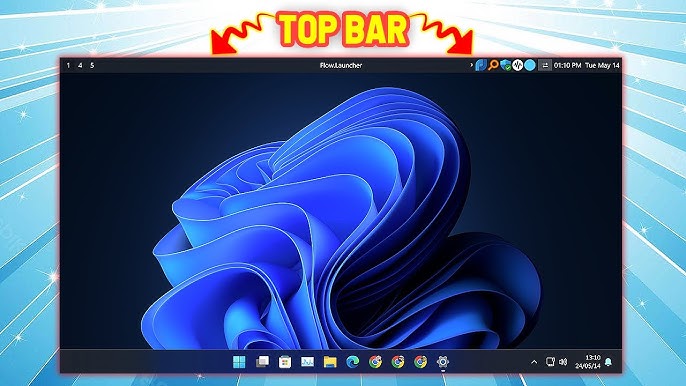
Native Tiling Window Manager for Windows
One of the biggest reasons GlazeWM is unique is that it is built specifically for Windows. Unlike many window managers that rely on emulation layers or Linux subsystems, GlazeWM runs natively on Windows. This means better performance, smoother window handling, and fewer compatibility issues with everyday Windows applications.
For users who love the idea of tiling window managers but don’t want to leave Windows, GlazeWM fills a major gap.
Automatic and Manual Tiling Flexibility
GlazeWM offers both automatic tiling and manual window control, giving users flexibility based on their workflow. Windows automatically arrange themselves in clean, organized layouts, reducing clutter and eliminating the need to constantly resize windows.
At the same time, users can manually adjust layouts, move windows, or switch modes when needed. This balance makes GlazeWM suitable for beginners and advanced users alike.
Automatic and Manual Tiling Flexibility Explained
GlazeWM is unique because it gives users the freedom to choose how much control they want over their windows. It supports both automatic tiling and manual window management, allowing users to work in a way that best fits their workflow.
With automatic tiling, GlazeWM arranges open windows into clean and structured layouts on its own. When you open a new application, it automatically fits into the available space without overlapping other windows. This keeps the desktop organized, reduces visual clutter, and removes the need to constantly drag or resize windows with a mouse.
At the same time, GlazeWM does not force users into a rigid layout. With manual tiling, users can move windows, resize them, change their positions, or switch layouts whenever needed. This is especially useful for tasks that require custom arrangements, such as design work, presentations, or multitasking across different screen sizes.
This combination creates a perfect balance. Beginners can rely on automatic tiling to stay organized without learning complex commands, while advanced users can fine-tune layouts and workflows for maximum productivity. By offering both options, GlazeWM adapts to the user instead of limiting how they work.
Simple and Powerful Configuration System
One of the biggest reasons GlazeWM stands out is its simple yet powerful configuration system. Many window managers require users to learn complex scripting languages or write long, confusing configuration files. GlazeWM takes a different approach by using a clean, human-readable config format that is easy to understand even for beginners.
Instead of writing complicated code, users can change settings in a straightforward way, making customization faster and less frustrating.
Keybindings
GlazeWM allows users to easily customize keyboard shortcuts. You can define which key combinations are used to move windows, switch workspaces, resize layouts, or close applications. This makes it possible to design shortcuts that perfectly match your workflow.
Window Layouts
Users can control how windows are arranged on the screen. Whether you prefer vertical tiling, horizontal splits, or specific layout rules, GlazeWM lets you adjust window behavior without complex commands. This helps keep the desktop clean and organized.
Workspaces
GlazeWM makes it easy to configure multiple workspaces. You can decide how many workspaces you want, how windows move between them, and which apps open on specific workspaces. This is especially useful for separating work, browsing, and communication tasks.
Appearance Behavior
With GlazeWM, you can control how windows behave visually. This includes focus behavior, window borders, spacing, and layout responses. The configuration options allow you to fine-tune how your desktop feels without changing the overall Windows look.
Startup Rules
GlazeWM allows users to define rules for apps when they start. You can set specific programs to open on certain workspaces, positions, or layouts automatically. This saves time and keeps your workspace organized every time you log in.
Why This Matters
Because the configuration system is simple, readable, and flexible, users don’t need advanced technical knowledge to get started. At the same time, advanced users still have full control to customize every part of their window management experience.
This balance between ease of use and deep customization is what makes GlazeWM’s configuration system truly unique.
Lightweight and Performance-Focused
GlazeWM is built with performance in mind, which means it uses very little CPU, memory, and system resources compared to traditional desktop utilities or full desktop environments. Instead of loading unnecessary visual effects or background services, GlazeWM focuses only on one core task: managing windows efficiently.
Because of this minimal design, GlazeWM runs quietly in the background without slowing down your system. It does not interfere with running applications, startup times, or overall system responsiveness. Even on lower-end or older hardware, users can experience smooth window management without lag.
This lightweight nature makes GlazeWM especially useful for developers, power users, and multitaskers who often run many applications at the same time, such as code editors, terminals, browsers, and communication tools. By reducing system overhead, GlazeWM ensures that more system resources remain available for the applications that matter most, resulting in a faster and more stable workflow.
Keyboard-Driven Productivity
Keyboard-driven productivity means controlling your entire desktop using keyboard shortcuts instead of the mouse. In GlazeWM, almost every window action such as opening, closing, moving, resizing, or switching between windows can be done with a few key presses.
Instead of dragging windows with a mouse or clicking through menus, users can instantly jump between applications, rearrange layouts, or switch workspaces using predefined shortcuts. This reduces unnecessary hand movement and keeps your focus on the task rather than on managing windows.
For developers, writers, and researchers, this approach saves time and increases efficiency. Coding becomes faster when you can switch between an editor, browser, and terminal without breaking concentration. Writers can move between documents and reference material smoothly, while researchers can manage multiple sources on screen without clutter.
Overall, keyboard-driven productivity in GlazeWM creates a faster, cleaner, and more focused workflow, allowing users to work efficiently with fewer distractions and better control over their workspace.
Workspace and Multi-Monitor Support Explained
Workspace Management in GlazeWM
Workspaces in GlazeWM work like separate virtual desktops, where each workspace can hold its own set of applications. Instead of keeping all programs on one crowded screen, you can divide your work into different spaces.
For example:
- One workspace for coding or work tools
- One workspace for communication apps like chat or email
- One workspace for browsing or entertainment
Each workspace can have its own window layout, meaning windows arranged in one workspace won’t affect others. When you switch between workspaces, GlazeWM instantly shows only the apps assigned to that workspace, helping you stay focused and organized.
This makes task management cleaner, faster, and far less distracting.
Multi-Monitor Support in GlazeWM
GlazeWM also works smoothly with multiple monitors, which is essential for productivity users. Whether you use two screens or more, GlazeWM keeps window behavior consistent across all displays.
Key benefits include:
- Each monitor can have its own active workspace
- Windows can be moved easily between monitors using keyboard shortcuts
- Layouts adapt automatically to different screen sizes and resolutions
- No broken layouts when monitors have different dimensions
This means a laptop screen and an external monitor can work together seamlessly without layout issues or window overlap.
Why This Feature Matters
Workspace and multi-monitor support together allow users to:
- Separate tasks clearly
- Reduce desktop clutter
- Switch contexts quickly
- Improve focus and efficiency
GlazeWM turns multiple screens and workspaces into a well-organized productivity system, rather than a chaotic collection of windows.
Open-Source and Community-Driven
GlazeWM is an open-source project, which means its source code is publicly available for anyone to view, study, and improve. This transparency allows users and developers to clearly see how the software works, reducing security risks and building confidence that there are no hidden or malicious components.
Being community-driven means GlazeWM is not developed by a closed team alone. Developers and users from around the world can contribute by reporting bugs, suggesting improvements, and adding new features. This collaborative development model helps GlazeWM evolve faster and stay aligned with real user needs.
Because of its open nature, advanced users can also customize or extend GlazeWM to match their workflow. Whether it’s modifying behavior, creating custom layouts, or improving performance, the open-source structure gives users full control instead of locking them into fixed features.
Overall, this openness creates trust, encourages innovation, and ensures GlazeWM continues to improve through active community involvement rather than depending on a single company or developer.
Beginner-Friendly Compared to Traditional Window Managers
Many window managers feel intimidating to new users. GlazeWM stands out by being beginner-friendly while still powerful. Its clear documentation, logical defaults, and simple setup process make it accessible even for users trying a tiling window manager for the first time.
Seamless Integration with Windows Workflow
GlazeWM respects the Windows ecosystem instead of fighting against it. It works well with common Windows apps, shortcuts, and workflows. Users don’t need to abandon familiar tools to benefit from advanced window management.
This makes GlazeWM a practical choice for professionals who rely on Windows but want a more efficient desktop experience.
Why GlazeWM Stands Out Overall
What truly makes GlazeWM unique is its ability to bring Linux-style tiling window management to Windows in a clean, native, and user-friendly way. It avoids unnecessary complexity, focuses on performance, and empowers users with full control over their workspace.
For anyone looking to improve productivity, reduce desktop clutter, and customize their Windows environment, GlazeWM offers a refreshing and powerful solution.
Conclusion
GlazeWM stands out as a unique window manager because it brings the power of tiling layouts to Windows in a native, lightweight, and user-friendly way. Its balance of automation and manual control, simple configuration system, strong keyboard focus, and smooth multi-monitor support make it ideal for productivity-focused users. By combining performance, customization, and beginner accessibility, GlazeWM offers a modern window management experience that fits perfectly into the Windows ecosystem.